


💊 Do not rely solely on online content for diagnosis or treatment.
📜 Information here is provided “as is” without any warranties.
Standing desk habits that fix posture might sound too simple to work, but trust me—they’re backed by solid science. If you’ve been battling neck aches, rounded shoulders, or that nagging lower back pain, you’re not alone. Millions of desk workers face these exact same struggles every single day. The good news? You don’t need hours of stretching or expensive therapy sessions. Just five minutes daily with the right standing desk habits can genuinely transform how your body feels and functions.
- Why Standing Desks Actually Matter for Your Posture
- Standing Desk Habits That Fix Posture
- Set Up Your Desk Height Correctly
- Follow the 30-30 Rule for Sitting and Standing
- Do a 5-Minute Posture Reset Routine
- Check Your Shoulder and Arm Position
- Use Active Standing Techniques
- How Standing Desks Compare to Traditional Desks
- Desk Type Comparison
- The Science Behind Posture Improvements
- Common Mistakes to Avoid
- Real Results You Can Expect
- Making It Stick: Tips for Long-Term Success
- The Bottom Line on Standing Desk Posture Habits
- My Experience & Insights
- Posture Problem Diagnostic
- Frequently Asked Questions
Why Standing Desks Actually Matter for Your Posture
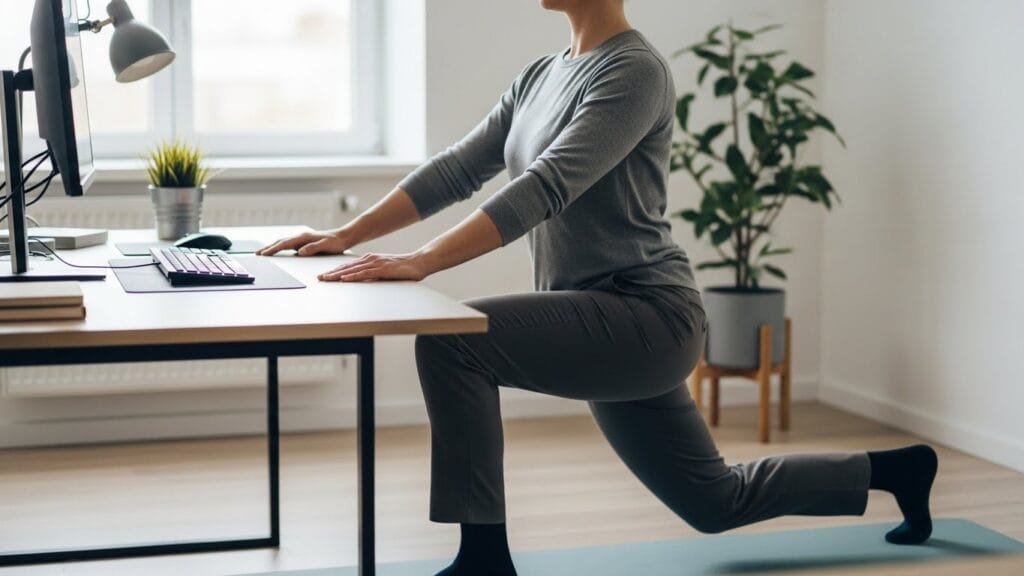
Here’s the thing about sitting all day: it wrecks your body slowly but surely. When you’re slumped in a chair for hours, your hip flexors tighten up, your shoulders roll forward, and your neck juts out like a turtle. That’s called forward head posture, and it’s one of the most common desk-related problems today.
Standing desks help interrupt this pattern. Research from Leicester shows that workers who used height-adjustable desks along with a structured program reduced their sitting time by over an hour each day. Professor Charlotte Edwardson, who specializes in Sedentary Behaviour and Health at the University of Leicester, led this groundbreaking study. She found that participants experienced small improvements in stress, wellbeing, vigour, and reduced musculoskeletal issues when they alternated between sitting and standing.
But here’s what most people get wrong: just buying a standing desk isn’t enough. You’ve got to use it properly and pair it with smart habits that actively correct your posture.
Standing Desk Habits That Fix Posture
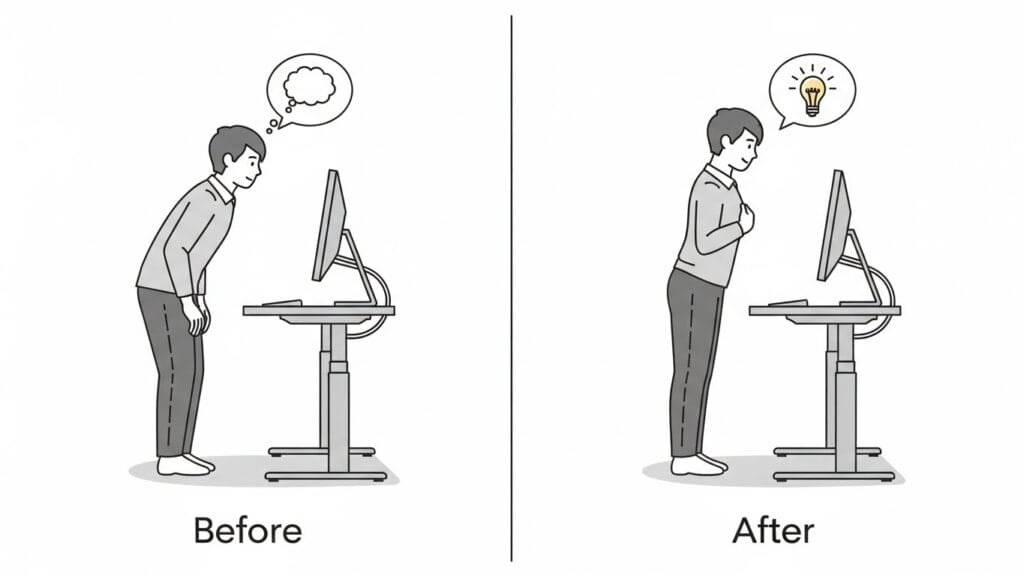
Let me walk you through five simple habits that take just minutes but deliver real results. These aren’t complicated yoga poses or equipment-heavy routines. They’re practical moves you can do right at your desk.
Set Up Your Desk Height Correctly
Before you do anything else, get your desk height right. Your elbows should bend at roughly 90 degrees when you’re typing, and the top of your monitor needs to sit at or just below eye level. This simple adjustment prevents you from craning your neck forward or hunching your shoulders.
When your screen is too low, you lean forward. Too high? You tilt your head back. Both positions strain your neck muscles and throw off your spine alignment. A study published in 2024 found that proper standing desk positioning improved cervical alignment and reduced muscle fatigue in workers with forward head posture.
Follow the 30-30 Rule for Sitting and Standing
You might think standing all day is the answer. It’s not. Standing too long can actually cause its own set of problems—joint pain, lower back discomfort, and leg fatigue.
Jack Callaghan, Ph.D., Professor and Canada Research Chair in Spine Biomechanics and Injury Prevention at the University of Waterloo, conducted research that changed how we think about sit-stand ratios. His team found that the ideal balance lies somewhere between 1:1 and 1:3—meaning you should stand for at least 30 minutes for every hour you work. Some experts even suggest standing for three minutes for every one minute of sitting when dealing with musculoskeletal discomfort.
Here’s a simple way to think about it: If you work an eight-hour day, aim for two to four hours of standing spread throughout. Set a timer on your phone to remind you to switch positions. This keeps your body moving and prevents the stiffness that comes from staying in any one position too long.
Do a 5-Minute Posture Reset Routine
This is where the magic happens. Five minutes of targeted stretches can undo hours of poor positioning. Here’s your quick routine:
Neck Rolls (60 seconds): Gently roll your head in slow circles—five times clockwise, five times counterclockwise. This releases tension in your neck and upper shoulders.
Shoulder Blade Squeezes (60 seconds): Pull your shoulder blades together like you’re trying to hold a pencil between them. Hold for five seconds, then release. Repeat 10 times. This strengthens the muscles that keep your shoulders back.
Standing Hip Flexor Stretch (90 seconds): Step one leg back into a lunge position, keeping your back straight and hips squared. Hold for 30 seconds, then switch legs. Tight hip flexors pull your pelvis forward and strain your lower back when you sit for extended periods.
Chest Opener (60 seconds): Stand up tall, clasp your hands behind your back, and lift your arms slightly while opening your chest. This counteracts the rounded-shoulder posture that comes from typing.
Calf Raises (60 seconds): Rise up on your toes, hold for a few seconds, then lower back down. Do 15 reps. This improves circulation and engages your leg muscles.
That’s it—five minutes total. Do this routine once in the morning and once in the afternoon. Your body will thank you.
Check Your Shoulder and Arm Position
When you’re working at your standing desk, pay attention to where your arms are. Your shoulders should be relaxed—not hunched up by your ears. Keep your elbows close to your body, not flared out to the sides, according to Mayo Clinic’s office ergonomics guide.
Research comparing sitting and standing postures shows that standing reduces shoulder rotation and decreases muscle activity in the upper trapezius muscle. This means less strain on those constantly tight shoulder muscles. If your arms are positioned correctly, you’ll feel less tension creeping into your neck and upper back throughout the day.
Use Active Standing Techniques
Standing still is almost as bad as sitting still. Your body needs micro-movements to stay comfortable and healthy. Here are a few ways to add movement while you stand:
- Shift your weight from one foot to the other every few minutes
- Use a balance board or anti-fatigue mat to encourage subtle movements
- Do seated marching (lifting your knees alternately) for 30 seconds every hour
- Take a few steps away from your desk every 20-30 minutes
These tiny movements keep blood flowing, prevent joint stiffness, and help maintain better posture naturally. Think of it like this: your body is designed to move, not to be a statue.
How Standing Desks Compare to Traditional Desks
Let’s break down the real differences between sitting all day and using a standing desk properly:
Desk Type Comparison
Compare the health impacts of traditional sitting desks vs. standing desks used correctly. Use the interactive controls to filter and highlight data.
| Factor | Traditional Sitting Desk | Standing Desk (Used Correctly) |
|---|---|---|
| Sitting Time | 8-10 hours daily | 4-6 hours daily |
| Posture Impact | Promotes slouching, forward head posture | Encourages neutral spine alignment |
| Muscle Fatigue | High neck and shoulder tension | Reduced upper trapezius fatigue |
| Energy Levels | Lower energy, afternoon slumps | Improved focus and alertness |
| Back Pain | Increased lower back discomfort | Reduced spinal pressure |
| Movement | Minimal throughout the day | Regular position changes encouraged |
This table shows why the habits matter just as much as the desk itself.
The Science Behind Posture Improvements
You might be wondering: how does standing for just a few extra hours really make a difference? The answer lies in your musculoskeletal system.
When you sit for long periods, certain muscles shorten and tighten (like your hip flexors and chest muscles), while others weaken and lengthen (like your glutes and upper back muscles). This imbalance pulls your body out of proper alignment.
A six-month study found significant reductions in musculoskeletal discomfort, especially in the neck, shoulders, and lower back. Participants also reported lower levels of post-work fatigue. The researchers concluded that regularly alternating between sitting and standing reduces strain on muscles and joints, leading to better overall physical comfort.
The key factor is consistency. Doing your five-minute routine once won’t fix years of poor posture. But when you make it a daily habit, your body gradually adapts. Your muscles relearn proper alignment. Your joints become more flexible. And those nagging aches start to fade.
Common Mistakes to Avoid
Even with the best intentions, it’s easy to mess up your standing desk setup. Here are the mistakes I see most often:
Standing Too Long Without Breaks: Remember, standing all day isn’t the goal. Balance is. If you stand for hours straight, you’ll just trade sitting-related problems for standing-related ones.
Wearing the Wrong Shoes: High heels or unsupportive shoes throw off your posture when standing. Opt for flat, comfortable footwear with good arch support.
Forgetting to Move: Standing still is only slightly better than sitting still. Make those micro-movements part of your routine.
Ignoring Screen Height: A monitor that’s too low forces you to look down, which defeats the whole purpose. Keep it at eye level according to ergonomic positioning guidelines.
Skipping the Stretches: The five-minute routine isn’t optional—it’s essential. Those stretches actively retrain your muscles and release built-up tension.
Real Results You Can Expect
So what happens when you actually commit to these standing desk habits? Based on multiple studies and countless real-world examples, here’s what you can reasonably expect:
Week 1-2: You’ll notice less afternoon stiffness. That tight feeling between your shoulder blades starts to ease up. You might feel a bit tired from standing more at first—that’s normal as your body adjusts.
Week 3-4: Your energy levels improve. You’ll catch yourself slouching less often because your muscles are getting stronger. Neck pain becomes less frequent.
Month 2-3: Forward head posture begins to correct itself. Research shows measurable improvements in cervical alignment after consistent standing desk use. You’ll have better endurance for maintaining good posture throughout the day.
Month 6+: Long-term studies demonstrate continued reductions in discomfort and fatigue. Your body has adapted to the new routine, and good posture starts to feel more natural than bad posture.
The research from Professor Edwardson’s team at Leicester showed that participants felt more energised, focused, and productive while experiencing fewer musculoskeletal issues. That’s the kind of transformation we’re talking about.
Making It Stick: Tips for Long-Term Success
Knowing what to do is one thing. Actually doing it consistently is another. Here’s how to make these habits stick:
Set Phone Reminders: Use alarms to remind you to switch positions and do your stretches. Apps like Stand Up! or StretchClock can help automate this.
Pair Habits with Existing Routines: Do your morning posture reset right after you pour your first coffee. Do your afternoon routine after lunch. Linking new habits to existing ones makes them easier to remember.
Track Your Progress: Keep a simple log of how often you stand, how long you stretch, and how your body feels. Seeing improvements on paper motivates you to keep going.
Start Small: If standing for 30 minutes sounds overwhelming, start with 10. If five minutes of stretches feels like too much, start with two. Build up gradually rather than burning out.
Get an Accountability Partner: Find a coworker who’s also trying to improve their desk setup. Check in with each other and encourage consistency.
Invest in Comfort Tools: An anti-fatigue mat, a small footrest, or a balance board can make standing more comfortable and sustainable.
The Bottom Line on Standing Desk Posture Habits
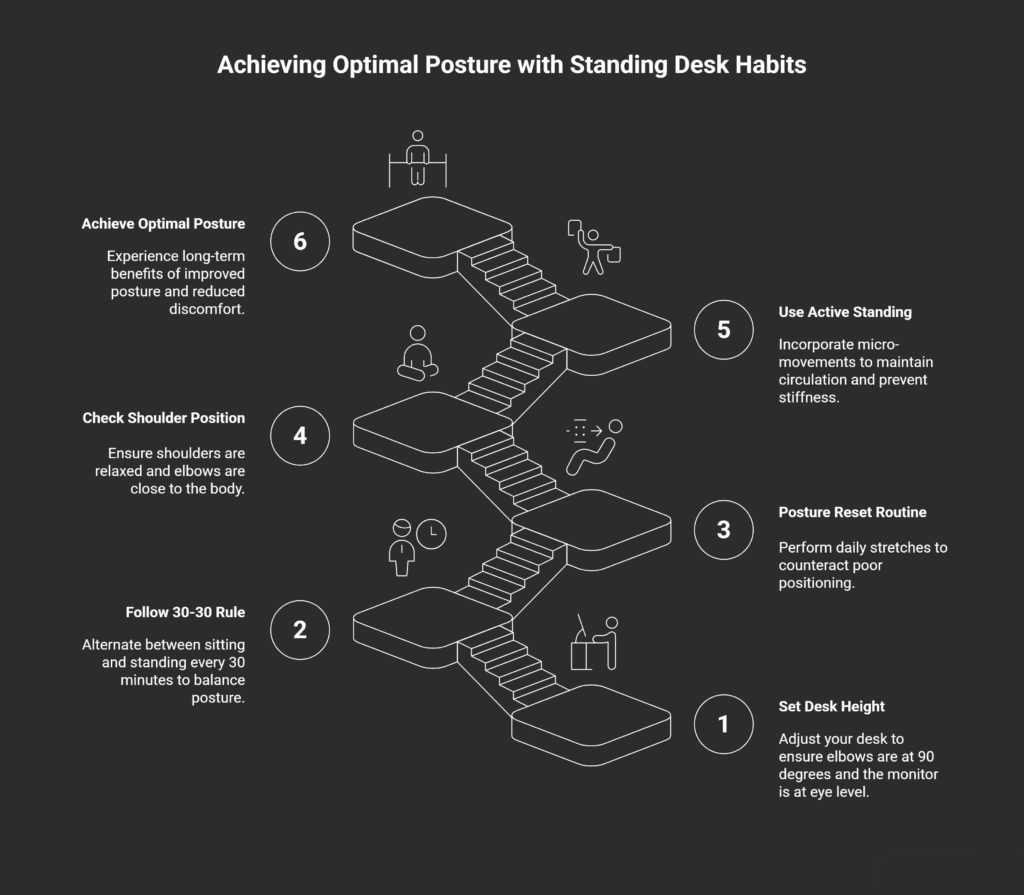
You don’t need fancy equipment or hours of your day to fix your posture. You just need the right habits, practiced consistently. Standing desk habits that fix posture come down to proper setup, balanced sit-stand timing, daily stretches, correct positioning, and active movement.
The research is clear: when you combine a height-adjustable desk with smart movement habits, you can reduce sitting time by over an hour daily, decrease muscle fatigue, and improve overall well-being. Dr. Callaghan’s work at Waterloo gives us the science-backed ratios to follow. Professor Edwardson’s studies at Leicester show us the real-world benefits.
Start with just five minutes today. Set up your desk height properly. Try the posture reset routine. Pay attention to how your body feels. Within a few weeks, you’ll wonder why you didn’t make these changes sooner.
Your neck, your back, and your future self will all be grateful. And that’s worth five minutes a day, don’t you think?
This article is part of our 5 Powerful Small Daily Habits That Transform Your Life pillar guide, where we explore simple, realistic habits that compound over time to improve energy, focus, and overall well-being.
My Experience & Insights
When I first dug into the research behind standing desks, I expected a clear “good or bad” answer. Instead, I kept finding the same message in different forms: it’s not the desk that fixes your posture, it’s the small, repeatable habits you build around it. Researchers like Professor Charlotte Edwardson at the University of Leicester, who has led large workplace trials on sit‑stand desks and sedentary time, keep pointing back to behavior change rather than gadgets alone. In other words, your body doesn’t care how expensive your desk is if you still stand with your shoulders up by your ears and stare down at a low screen all day.
As I read through ergonomic guidelines and long-term sit‑stand studies, a pattern started to stand out. People often knew something was wrong with their posture—neck pain, tight hips, stiff mid-back—but they couldn’t quite name what type of posture they had. Some had more of a forward‑head “tech neck” pattern, others had a sway back with their hips pushed forward, and some blended a bit of everything. Yet most advice online treated all posture problems as if they were the same. That gap between “I hurt” and “I know exactly what’s going on and what to do” is what pushed me to create something more targeted.
To make this more practical for readers, I built a simple tool called the Posture Problem Diagnostic. It’s not a medical device and it doesn’t try to “diagnose” in a clinical sense. Instead, it uses a structured, research‑style checklist to help you notice patterns in your own posture. You answer a few clear questions about where you feel pain (neck, shoulders, mid‑back, lower back), how your desk is set up (screen height, chair or standing surface, keyboard distance), and common symptoms (headaches, tingling, stiffness, afternoon fatigue). The tool then groups your answers into a likely posture pattern and suggests three focused exercises that match that pattern, rather than sending you a giant list of random stretches.
For example, if you report a lot of upper‑back tightness, forward head position, and a low monitor, the tool leans toward a “forward head / rounded shoulders” pattern. In that case, you’d see three exercises built around opening the chest, strengthening the mid‑back, and improving neck alignment. If your main issues are tight hips, lower‑back ache, and long sitting periods, it shifts toward a more “anterior pelvic tilt / hip flexor tightness” pattern, with exercises that focus on hip flexor length and glute activation instead. The idea is simple: instead of guessing which of the hundreds of posture exercises might help, you get a small, research‑informed shortlist that actually fits your situation.
From a research point of view, this kind of structured self‑reflection matters. Many studies that look at standing desks, musculoskeletal pain, and ergonomics rely on questionnaires about discomfort, workstation setup, and self‑reported posture. By turning that same style of questioning into a friendly web tool, you’re using the same logic researchers use—just in a way that feels approachable and practical. You’re not just told “stand more”; you see why a certain habit or stretch matches your posture pattern and how it connects to what the evidence suggests about muscle imbalances, joint loading, and workstation layout.
What I’ve noticed, both from the literature and from people using the Posture Problem Diagnostic, is that the biggest shift isn’t just physical—it’s awareness. Once you can name your posture type and see it linked to specific habits (like a low monitor, locked knees at a standing desk, or long, uninterrupted sitting blocks), it becomes much easier to make consistent, five‑minute changes. That’s really the heart of it: a standing desk is just one piece. When you pair it with clear feedback, a simple way to understand your posture, and three focused exercises you can actually remember, those small daily habits start adding up in a way that feels realistic instead of overwhelming.
Posture Problem Diagnostic
Identify your specific posture issues and get personalized exercises to improve your desk posture.
Your Posture Type
Based on your symptoms, here’s your posture diagnosis:
Tip: Perform these exercises during your 5-minute posture reset routine (morning and afternoon) for best results.
Frequently Asked Questions
How long should I stand at my standing desk each day?
You should aim to stand for 2-4 hours spread throughout an 8-hour workday. Research from the University of Waterloo suggests an ideal sit-to-stand ratio of 1:1 to 1:3, meaning you should stand for at least 30 minutes for every hour you work. Start with shorter intervals (10-15 minutes) if you’re new to standing desks, then gradually increase. The key is alternating positions regularly rather than standing all day, which can cause its own problems like leg fatigue and joint pain.
Can a standing desk really fix my posture in 5 minutes a day?
Yes, but with an important clarification: the standing desk alone won’t fix your posture. However, combining proper desk setup with a targeted 5-minute daily stretching routine can make measurable improvements. Studies show that consistent posture exercises addressing neck alignment, shoulder blade strength, and hip flexor tightness can reduce forward head posture and musculoskeletal discomfort within 2-3 months. The “5 minutes” refers to the daily exercise routine, not just standing—you need both the habit and the movement work.
What is the correct height for my standing desk and monitor?
Your standing desk should be set so your elbows bend at 90 degrees when typing, with your forearms parallel to the floor. Your monitor’s top edge should sit at or slightly below eye level, about an arm’s length away (20-28 inches). If your screen is too low, you’ll crane your neck forward; too high and you’ll tilt your head back, both causing strain. Many people need a monitor riser or laptop stand to achieve proper height, especially if they’re taller than average.
Why does my back hurt more after using a standing desk?
Standing desk back pain usually happens for three reasons: standing too long without breaks, poor posture while standing (locked knees, leaning on one hip), or weak core and hip muscles. If you’re new to standing, your body needs time to build endurance in postural muscles. Make sure you’re following the 30-30 rule (alternating sit/stand every 30 minutes), wearing supportive shoes, using an anti-fatigue mat, and doing hip flexor stretches daily. If pain persists beyond 2-3 weeks, check your desk height and consider consulting a physical therapist.
What exercises should I do at my standing desk to improve posture?
The five most effective standing desk exercises are: (1) Neck rolls to release upper trapezius tension, (2) Shoulder blade squeezes to strengthen mid-back muscles and counter rounded shoulders, (3) Standing hip flexor stretches to prevent anterior pelvic tilt from sitting, (4) Chest openers to counteract forward-hunched typing posture, and (5) Calf raises to improve circulation and engage leg muscles. Do this 5-minute sequence twice daily—once mid-morning and once mid-afternoon. These movements target the exact muscle imbalances that develop from desk work.
Is it better to sit or stand while working at a desk?
Neither sitting nor standing all day is ideal—the best approach is alternating between both. Prolonged sitting increases risk of metabolic issues, cardiovascular problems, and musculoskeletal pain, while standing too long can cause lower back discomfort, leg fatigue, and varicose veins. Research from the University of Leicester shows that using a height-adjustable desk to reduce sitting by 1+ hour daily improves energy, reduces stress, and decreases pain. The goal isn’t to eliminate sitting; it’s to break up long sedentary periods with standing intervals and movement throughout your workday.
💊 Do not rely solely on online content for diagnosis or treatment.
📜 Information here is provided “as is” without any warranties.